Superstore ETL Pipeline
This project is a Python-based ETL (Extract, Transform, Load) pipeline for processing Superstore sales data. It takes raw sales data in CSV format, cleans and standardizes it, and outputs the processed data to both a cleaned CSV file and an SQLite database.
Project Structure
superstore_etl/
├── main.py          # Main execution script to run the ETL pipeline
├── config.yaml      # Configuration file with source and database paths
├── notebooks/       # Directory for Jupyter notebooks (e.g., data exploration)
├── data/
│   ├── source/      # Raw source data (e.g., Sample - Superstore.csv)
│   └── processed/   # Processed outputs (cleaned CSV, SQLite DB)
└── src/
    ├── extract.py   # Data extraction logic (reads CSV)
    ├── transform.py # Data cleaning, imputation, and transformation logic
    └── load.py      # Logic to load data into CSV and SQLite
How It Works
- Extract (
src/extract.py): Reads the raw CSV data from the path specified inconfig.yamlusing the configured encoding. - Transform (
src/transform.py): Cleans the data by:- Handling and imputing missing values with "Unknown" or
0. - Removing duplicate records.
- Casting date columns (
Order Date,Ship Date) to correct datetime formats. - Trimming whitespace and standardizing string formats (Title Casing).
- Validating numeric columns (
Sales,Quantity), filtering out strictly non-positive values. - Standardizing column names (lowercase with underscores) to prepare them for a database insertion.
- Handling and imputing missing values with "Unknown" or
- Load (
src/load.py): Exports the cleanedpandasDataFrame to a processed CSV file and loads it into an SQLite database (cleaned_superstoretable) specified in the config.
Setup and Installation
- Ensure you have Python installed.
- Install the necessary dependencies:
pip install pandas pyyaml - Place the raw data file into the appropriate directory as specified in
config.yaml(e.g.,data/source/Sample - Superstore.csv).
Usage
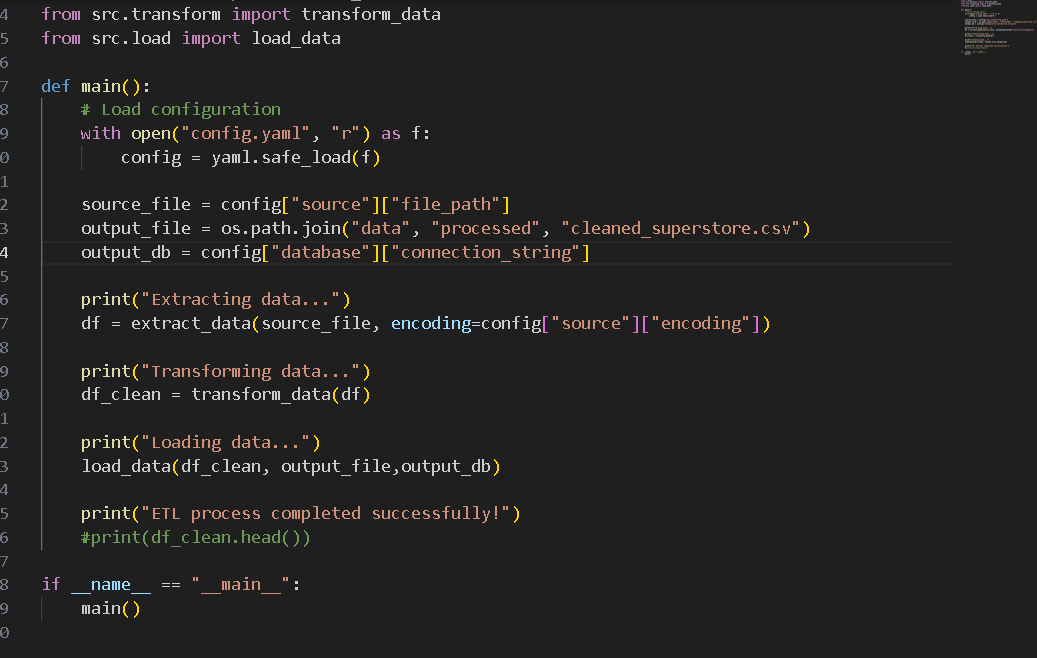
To run the full ETL pipeline, simply execute the main.py script:
python main.py
This will read the configuration, perform the data extraction, transformation, and load processes, and output success and completion messages to the console.